AI portfolio

AI in production at a $5M nonprofit

I'm Tim Molloy, COO of the Santa Barbara Rescue Mission, a $5M homeless-services and residential drug-treatment nonprofit serving 237 people daily across three campuses, with about 40 staff and 200+ volunteers. The systems below were built with Claude Code, Azure AI Foundry, and Vertex AI, under our actual constraints: HIPAA, small budgets, and staff who are not engineers.

Tim Molloy · LinkedIn

Tim Molloy

At a glance

6

AI systems in production

5

Scheduled runs

~$22

Combined monthly run cost, all systems

31%

Admin cost cut, document workflows

The six: gift processing · mail routing · package intake · card & AP review · email triage · finance dashboards

How I build

Compliance decision first, cost decision second

Three hosting locations: Claude Managed Agents, Azure AI Foundry or Google Vertex for BAA-covered work, and a self-hosted app server. I manage costs by using the cheapest tool that accomplishes the task.

Use AI and humans for what they are each best at

Agents manipulate data and words: sort, draft, flag, and notify. People provide judgement: approve, send, and decide. I build controls that reduce the surface area where an agent can make a critical mistake.

Workloads are tested for quality

Each workload gets its own eval suite, re-run against new model generations so I can pick the cheapest model while ensuring the outcomes match the expectation.

Nothing depends on me alone

Systems run in the organization's own accounts with vaulted credentials, not on my laptop. A second staff member holds org admin, and our first AI system is now owned day-to-day by an admin-level staff member I trained into the role.

Five systems, in detail

Live running in production Built & tested end-to-end validated, launch gated Selected & priced savings projected, not yet claimed

Every letter and package processed and accounted for

Live

Mail agent (Apr 2026) + package tracker · vision models, Dynamics 365, scheduled cloud agents

The problem

In 2023, an internal theft incident involving residents' mail exposed a control gap. I immediately reduced the risk of theft with policy and culture changes, but we still had both the technical and labor-intensive challenge of sorting and moving 250+ pieces of mail through the facility daily.

What I built

Front-desk staff photograph each letter or shipping label. A vision agent reads it, resolves the recipient across three separate Dynamics 365 environments (shelter, treatment, sober living, with recency-based routing when a name matches in more than one), notifies the person directly, and sends per-program digests to staff. Everything runs in the org's own workspace with vaulted credentials. The package-tracker half alone carries 232 automated tests and runs as an hourly weekday scheduled agent.

Where humans stay in the loopStaff still hand every item to its owner. The system removes the sorting and creates the log.
Pieces routed daily~250
Recipients resolved270+
Front-desk handling90 → 30 min/day
Automated tests (package half)232
Monthly run cost$9.09
Time saving is one measurement across mail + packages combined, counted once.
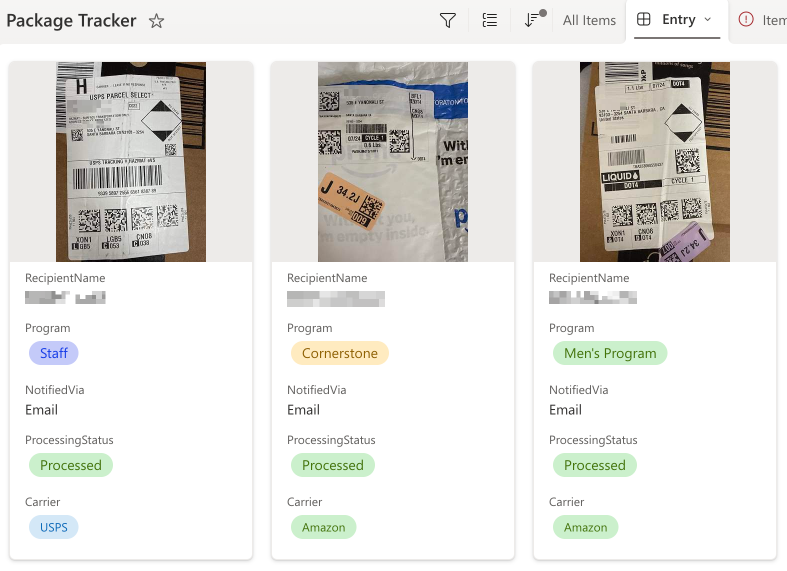
Package tracker entries in Dynamics 365 showing label photos, recipients, programs, and notification status
Package tracker entries in Dynamics 365: label photo, recipient, program, and notification status. Names redacted.

Gift processing without the data entry

Live

Donation pipeline · Azure AI Foundry, multi-model OCR verification, DeepEval benchmarks

The problem

The organization receives 80% of donations as paper mail. The processing of the documents became a bottleneck that would slow down fundraising and compliance. It took hundreds of staff hours a year in manual data entry, and our donor stewardship efforts depend on accuracy.

What I built

An AI pipeline on Azure AI Foundry that automates acceptance, recording, and acknowledgment. Staff take a picture of the donation and the AI agent automatically processes it. I started with consultants on the proof-of-concept, then brought iteration in-house. Accuracy is checked at several layers: cross-model OCR verification, inverted confidence scoring to surface hard-to-read image regions, and a custom DeepEval benchmark suite built for this exact workflow, re-run against each candidate model (four generations so far) before anything is changed.

Where humans stay in the loopLow-confidence items route to human review, and day-to-day ownership now belongs to an admin-level staff member I trained into the role.
Gift-processing labor−88%
Staff hours returned~600/yr
Model generations benchmarked4
Monthly run cost$3.51
Errors past review flags0.7%
a decrease from the previous system

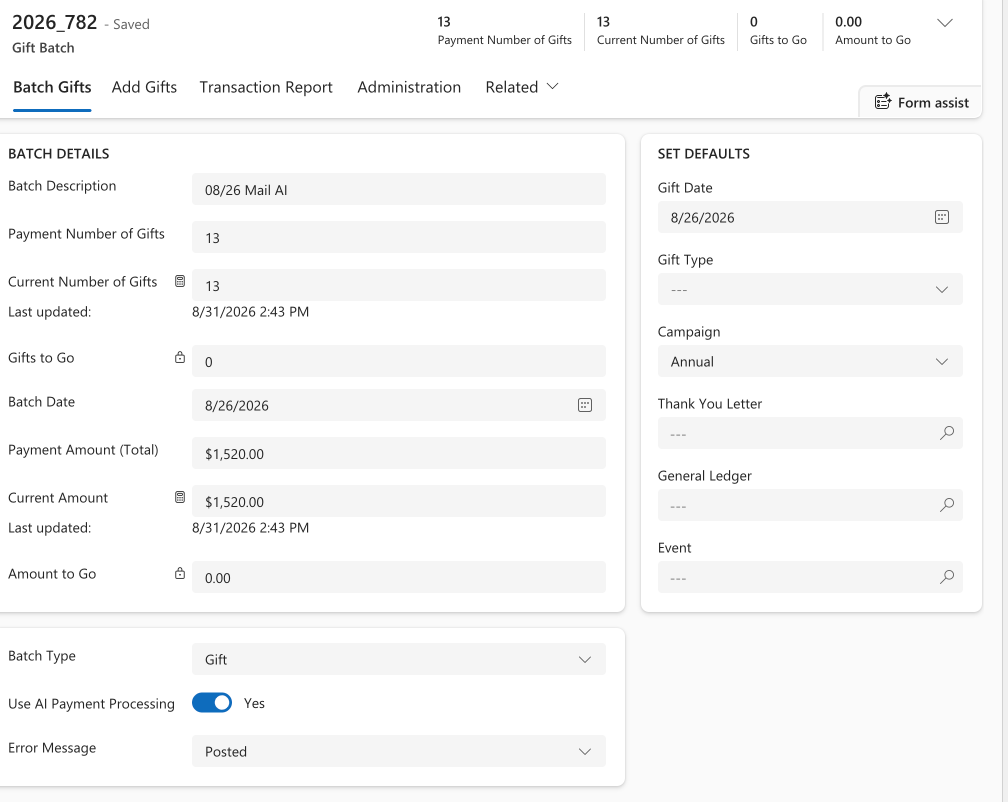
A gift batch in the donor system posted by the AI pipeline, showing 13 gifts totaling $1,520 with AI payment processing enabled
A mail-day gift batch posted by the pipeline: 13 gifts, $1,520, "Use AI Payment Processing: Yes."

One vetted AI toolkit for the team

Live

Installable org plugin · 11 skills, 10 commands · versioned from one repository

The problem

The frontier, or jagged edge, of AI capabilities is not user-friendly. I needed to solve how to disseminate the latest knowledge and tools for using these systems to my team.

What I built

I packaged my own working toolkit into a distributable plugin and published it organization-wide: 11 skills and 10 commands covering writing, structured analysis, spreadsheet building, policy drafting, document QA, and web research. It ships in two form factors so adoption reaches both the technical and non-technical staff. Two highlights: a writing-quality skill built on 67 documented patterns of AI-sounding prose, so staff output meets our writing standards instead of being AI-slop; and a competitive-pay agent that sweeps local job postings against our 16 tracked roles and syncs matches into the SharePoint list HR uses to set floor pay, turning an annual manual comp survey into an automated system.

Where humans stay in the loopThe toolkit standardizes format and guardrails which allows for more time for staff to ensure the substance is in line.
Skills shipped11
Commands shipped10
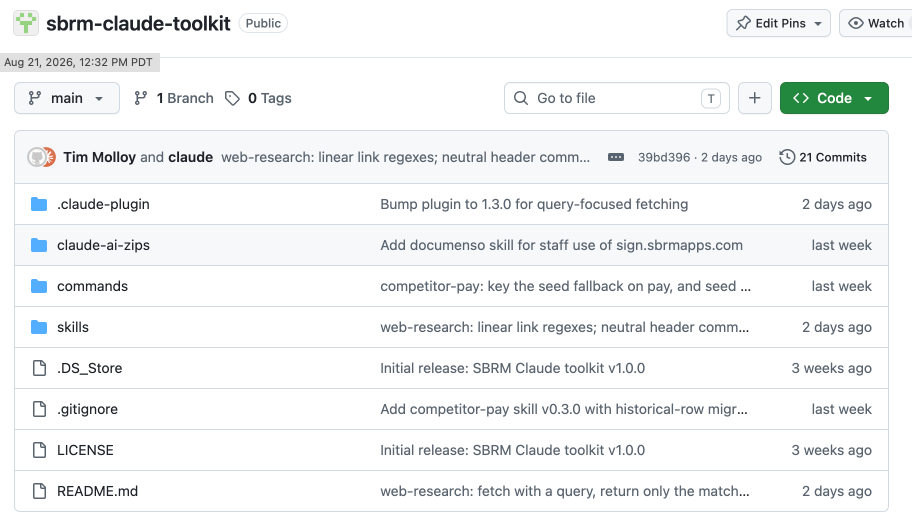
The toolkit's GitHub repository showing skills, commands, and plugin folders with recent commits
The toolkit's repository: versioned skills and commands staff auto-update from.

HIPAA-compliant clinical notes on a budget

Built & tested

Therapy-session transcripts → draft progress notes · Google Cloud, Vertex AI, signed BAAs

The problem

Clinicians spend too much time writing therapy notes, and most AI shortcuts on the market move protected health information out of our control, do not integrate with our existing systems, or are too expensive.

What I built

A documentation pipeline that turns clinical session transcripts into draft progress notes entirely inside a signed-BAA environment to ensure we are compliant with HIPAA. Staff record sessions and get accurate and compliant clinical notes sent to them quickly. Client and staff consent is managed, transcripts auto-delete, and output files as a factual progress note. I built it for the clinical group practice where I serve as practice administrator, and a pilot inside our own residential treatment program has been green-lit.

Where humans stay in the loopEvery note is a draft until a clinician reviews and signs it. My own line-by-line compliance review of the finished build found three go-live blockers no one else had caught, which is why the label says built & tested, not launched.
Weekly clinical sessions72
Note-writing time17 → 4 min/session
Estimated API cost~$9/mo

E-signature for ~$500 a year instead of $7,200+

Selected & priced

Split-architecture signing · self-hosted platform + hosted API · ~2,250 documents/yr

The problem

Commercial e-signature quotes came in at $7,200–$10,800/yr for our ~2,250 annual documents, with most solutions being overkill for our needs.

What I built

A compliant and useful DocuSign-like app for staff plus a managed signature API for our client documentation automations, with an AI agent to keep it running. A self-hosted platform handles the ~250 human-initiated HR and volunteer documents while a hosted API handles the ~2,000 machine-initiated client documents. It runs on the org's self-hosted application server, which I hardened myself: 2FA on every admin account, vaulted secrets, and encrypted offsite backups. An AI agent provides the sys admin work to keep it working.

Where humans stay in the loopPeople still read and sign their own documents, we just replace a SaaS product with something free while getting AI to manage it.
Commercial quote$7.2–10.8K/yr
Selected build~$500/yr
Documents covered~2,250/yr
Deployed (hosted API in progress)50%
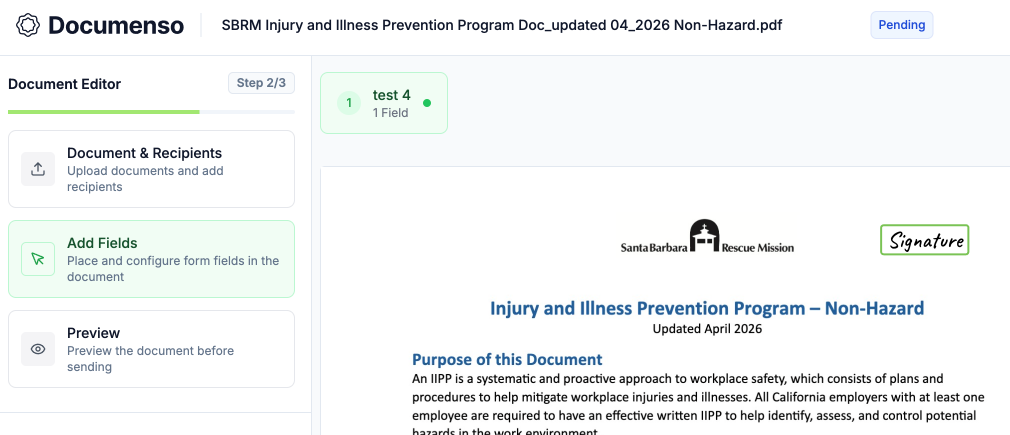
The self-hosted signing platform preparing a staff safety-program document for signature
The self-hosted signing platform preparing a staff safety-program document. Test recipient shown.

Also in production

  • Credit Card & AP review Claude agent on our corporate credit cards and billing (Ramp) screens $650K/quarter in spend. Every transaction gets a first-pass anomaly and fraud check before my review. 2 hrs → 15 min/wk
  • Email triage Inbox sorted, drafted, and queued. Nothing sends without me. Zero instances of it hiding a message I needed. ~90 → 10 min/day · ~$0.15/mo
  • Finance dashboards QuickBooks → Claude → Excel pipeline replaced a half-day manual build at each close. ~4 hrs → near-instant

What is next: volunteer operations

An organization built on volunteers depends on volunteer operations being efficient and accurate. Before any of the AI tools existed, I overhauled our volunteer program of 200+ active volunteers: new management system, new policies, streamlined onboarding, and a cultivation pipeline from volunteer to donor. The next step is spinning up an AI agent to manage the busy work including compliance documentation, scheduling conflicts, and volunteer account management.

+100%

Legal compliance

−20%

Staff time managing volunteers

+27%

Donations per volunteer